Exploring the stars, thousands of light years away from Earth, sounds pretty great right about now. While Darian Johnson hasn't invented intergalactic travel, he has created a tiny desktop computer that looks straight out of Jean-Luc Picard's ready room, letting you at least pretend that you're safely aboard a distant starship.It's a testament to Star Trek: The Next Generation's production designers, including technical consultant Michael Okuda, that the fictional LCARS (short for Library Computer Access/Retrieval System) operating system used on the computers aboard the USS Enterprise-D still look futuristic, despite the show first airing 33 years ago. Gene Roddenberry himself insisted that the computer screens aboard the ship be as minimal and clean as possible to give the impression of the technology being incredibly advanced, and it's an aesthetic that many fans of the show are still fans of, including Johnson.Johnson's LCARS computer is based on an existing design for a similar TNG-themed alarm clock, which he upgraded with a larger 3D-printed enclosure, bigger screen, and additional components to add considerably more functionality.Using everything from an Adafruit ESP32 Feather Board to Amazon's AWS cloud servers, the computer can access and display a host of information, accessible with a series of simple buttons, including the weather, the temperature and humidity of the room, news headlines, calendar data pulled from Microsoft Outlook, fitness info courtesy of Google Fitness, a resistor color code chart and calculator, and even a tool for measuring power and current that Johnson can use as he develops other devices. Geordi La Forge would be proud.All of the files and schematics needed to create and customize your own are available for free on Hackaday for download, and while you don't need to be a Starfleet caliber engineer to build one, you will need soldering, electronics, and programming skills to make it so.
Many claimed to build a ternary computer, however nobody (to the best of my knowledge) completed the project. Triador project makes no empty promises! I am building a very simple but functional 3-trit balanced ternary computer. The only building block allowed is a ternary multiplexer based on DG403 analog switches. You can find more details on the build at the homebrew ternary computer hackaday project. Also check this youtube mini-series about the hardware: This repository contains a program emulator that eases the debugging of the hardware. Triador has a 3-trit architecture, this means that its registers can store numbers from -13 to +13. It has four main registers R1-R4 and nine extra registers R5-R13. Note that R13 is a special register used to choose current program memory segment (more on this below). So, in total, Triador can store 13 numbers from the [-13..+13] range. In addition to that, it has a 1-trit borrow/carry flag and a 6-trit program counter register. The rea...
There has been no shortage of mini-consoles since Nintendo kickstarted the trend with its NES Classic, and being a sucker for nostalgia I've collected most of them. They're fine things, all, though they often end up on the shelf after a couple of weeks once I've revisited everything. The PC Engine Mini, though, has been plugged into my TV constantly for a month now, and has been played far more than any of its other tiny hardware brethren. Why's that, exactly? It's simple, I think - the PC Engine Mini offers the thrill of discoverability. If you're a diehard collector maybe that's not the case for you, though I think for most of us the PC Engine and its original games line-up has been out of reach for some time. Its release in the UK in 1990 was some three years later than its introduction in Japan and, as a result of the system's failure in America, limited. Many of its very best games never made it west at all, and even if you did want to import you...
Did you know: Alex Kidd served as Sega's mascot for a brief spell during the late 1980s but as Nintendo's flagship Mario character gained momentum, the company went in a different direction as Alex Kidd wasn't resonating with consumers as much as Sega had hoped for. In 1991, Sega introduced Sonic the Hedgehog and stuck with him as their official mascot for the long haul. One of Sega's lesser-known mascots is making a return to gaming. Alex Kidd, the protagonist of several video games in the late 80s, will return early next year in Alex Kidd in Miracle World DX. A remake of the 1986 Master System game, the new version will include all of the content from the original as well as new levels, alternative bosses, tweaked combat, movement mechanics and menu system plus new modes including a boss rush mode. There's also a retro mode should you prefer the blocky mid-80s visuals. The remake, announced during...
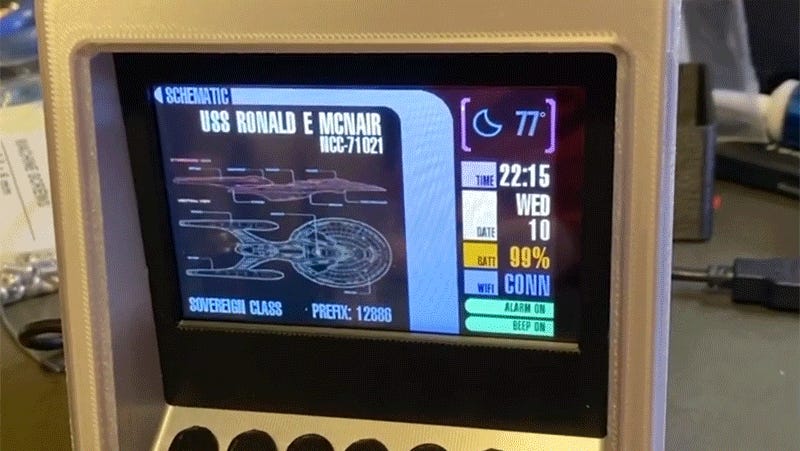 Exploring the stars, thousands of light years away from Earth, sounds pretty great right about now. While Darian Johnson hasn't invented intergalactic travel, he has created a tiny desktop computer that looks straight out of Jean-Luc Picard's ready room, letting you at least pretend that you're safely aboard a distant starship.It's a testament to Star Trek: The Next Generation's production designers, including technical consultant Michael Okuda, that the fictional LCARS (short for Library Computer Access/Retrieval System) operating system used on the computers aboard the USS Enterprise-D still look futuristic, despite the show first airing 33 years ago. Gene Roddenberry himself insisted that the computer screens aboard the ship be as minimal and clean as possible to give the impression of the technology being incredibly advanced, and it's an aesthetic that many fans of the show are still fans of, including Johnson.


Comments
Post a Comment